Create a Chart of Accounts and Main Accounts
To track and maintain financial information in an organization, you can set up a chart of accounts, which is a structured list of a legal entity’s general ledger accounts. The chart of accounts is used in ledger setup, which is part of the setup for the general ledger.
A main account is an account in the general ledger. The number of main accounts that you need to create depends on the accounting process and will vary among institutions.
While configuring the chart of accounts and financial dimensions in Anthology Finance & HCM, ensure that the validations provided in the following table for the various accounts in Anthology Student are considered:
| Accounts location in Anthology Student | Account type | Should not exceed |
|---|---|---|
| Accounts on the Bank account page | GL Debit Account | 64 characters |
| GL Credit Account | 64 characters | |
| NSF Pending Account | 50 characters | |
| Deposits Pending Account | 50 characters | |
| GL Accounts on the Subsidiaries code Setup page | Debit Account | 100 characters |
| Credit Account | 100 characters | |
| Student Accounts on the General Ledger Link page | Debit Account | 100 characters |
| Credit Account | 100 characters |
To create a chart of accounts and main accounts:
-
Navigate to General ledger > Chart of accounts > Accounts > Chart of accounts.
-
Select New.
-
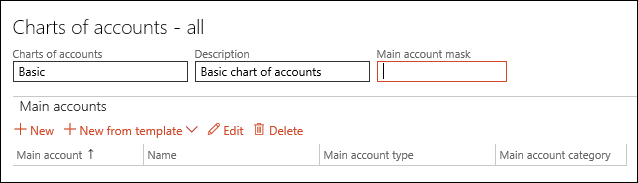
In the Chart of accounts field, enter a name for the chart of accounts.
-
In the Description field, enter a description.
-
In the Main account mask field, enter a format mask for a main account to create a structure that is used when main accounts are created for the chart of accounts.
To specify a mask, use letters or hyphens for characters that remain the same for each main account and use number signs (#) and ampersands (&) as placeholders for letters and numbers that will change every time a main account is created.
-
In the Main accounts section, select New.
-
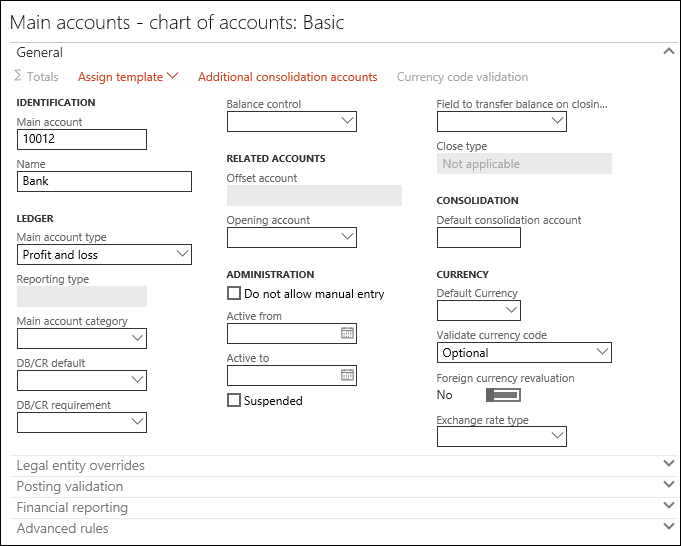
In the Main account field, enter an account number.
-
In the Name field, enter a name for the Main account.
-
In the Main account type field, select the type of main account.
-
Specify values in the appropriate fields.
-
Select Save and close the Main accounts form.
-
Select Save and close the Chart of accounts form.
External Links:
Microsoft Documentation:
