Create Journal Names
The journal name is used as a template. It contains information that is reflected in all the journals that are created from this template.
Notes:
-
When Anthology Finance & HCM is integrated with Anthology Student, it is necessary to set up journal names for the Daily and Customer payment types of journals. This is required to receive student transactions successfully from Anthology Student.
-
For a proper check reversal process, the journal name of the Bank check reversal journal type must be set up.
To create a journal name, perform the following steps:
-
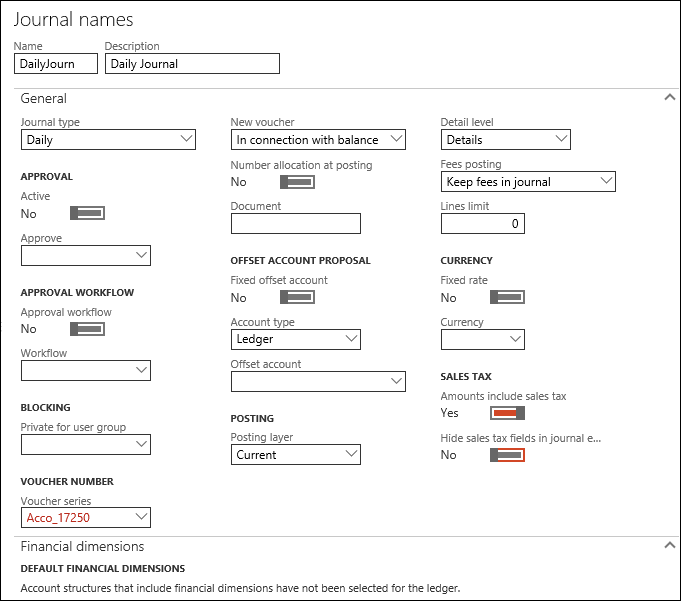
Navigate to General ledger > Journal setup > Journal names.
-
Select New.
-
In the Name field, enter a unique name.
-
In the Description field, enter a description for the Journal name.
-
In the Journal type field, select a journal type.
-
In the New voucher field, select one of the following options:
-
In connection with balance
-
One voucher number only
Note: A single journal per entry type is created by adding all transactions as lines. Each journal type is sent as a single file. If a user selects multiple refunds and stipend checks, group them accordingly:
- Stipend (Group 1)
- Refund (Group 2)
This applies to all kinds of transactions.
-
-
Select a value in the Voucher series field.
To avoid duplicate voucher values, use either a uniform number sequence in the Voucher series field for all journal names or apply distinct formats for each journal name. The following are examples of different formats: #####, CMC-######, REV-#####, #####-JOUR.
-
In the Account type field, select an account type.
-
Select Ledger for Daily Journal type.
-
Select Bank for Customer payment Journal types.
-
-
Specify values in the appropriate fields and select Save.
The Journal name is created.
-
Close the Journal names form.
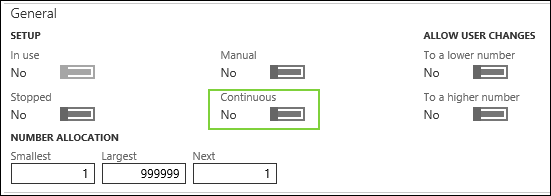
After creating the Journals, update the Number sequence selected in the Voucher Series field to Non-Continuous for the Daily and Customer Journals. To do so, perform the following steps for the Daily and Customer Journals:
-
Navigate to General Ledger > Journal Setup > Journal names.
-
Select the required Journal name.
-
On the Journal names page, locate the Voucher series field and select its value.
-
On the Number Sequence page, select Edit.
-
In the General section, set the Continuous field to No.
-
Select Save and close the form.
External Link:
Microsoft Documentation: Ledger journal types.
