Generate Earning Lines Using the Overflow Earning Code
The overflow earning code feature allows users to partially process the Federal Work-Study (FWS) earning lines when the award balance is insufficient. When the earnings amount exceeds the award balance, the earning lines are validated with the overflow earning code, and the same is stamped on the earning line.
To generate earning lines using overflow earning code, the overflow earning code needs to be assigned to the Federal Work-Study award, which can be achieved using one of the following options:
-
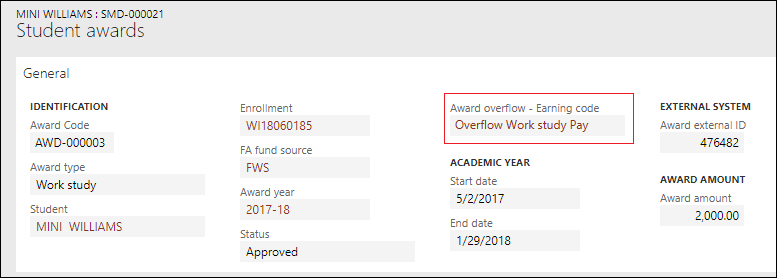
Set the earning code in the Award overflow - Earning code field for the Federal Work-Study award on the Student Awards page.
-
Set the earning code in the Earning code field for all Federal Work-Study awards on the Federal work study tab of the Set Up Student Accounting Parameters page.
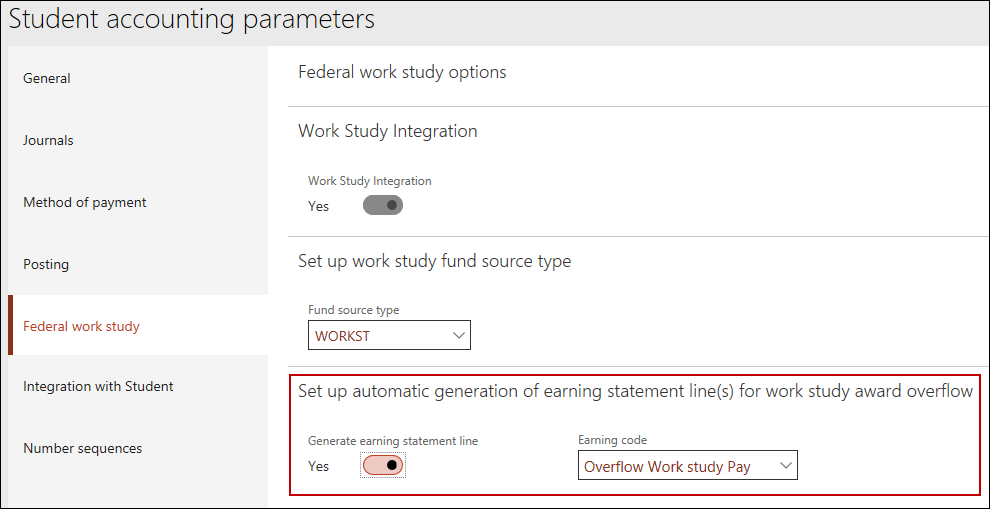
When the award balance is insufficient while generating the earning lines for a worker, the earning code configured in the Award overflow - Earning code field is consumed to generate the remaining earnings. If the Award overflow - Earning code is not configured on the Student Awards page, the award overflow earning code configured on the Student Accounting Parameters page is used to generate the earning lines.
For information on generating Federal Work-Study earnings, refer to Generate Federal Work-Study Earnings.
