SaveProspectInquiry
The SaveProspectInquiry activity saves a record that was created with the CreateProspectInquiry activity.
The result of the SaveProspectInquiry activity depends on whether the data passed in by the activity exists in the Anthology Student database and whether multiple inquiries are allowed in Anthology Student.
-
If the name and address data passed in the SaveProspectInquiry does not exist in Anthology Student, a SyStudent record (that includes a Prospect record) and SyStudentInquiry record will be created as an instance of a prospect.
-
If the name and address data passed in the SaveProspectInquiry exist in Anthology Student and multiple inquiries are allowed in Anthology Student, the existing SyStudent record is looked up and a new value is saved in the prospect collection (SyStudentInquiry).
-
If the name and address data passed in the SaveProspectInquiry exist in Anthology Student and multiple inquiries are not allowed in Anthology Student, the SyStudent record is updated with the values passed in by the activity.
To check the setting for multiple inquiries in Anthology Student, navigate to Setup > Campus Locations > select a campus > Add/Edit (button) > Allow... (tab). If "Track Multiple Lead Inquiries" is selected, the duplicate check function is enabled (see case b).
Note
The Leads web service provides the following configuration options in the <appSettings> section of the web.config file:
<add key="NewLeadSingleDuplicateHandling" value="I" />
— OR —
<add key="NewLeadSingleDuplicateHandling" value="E" />
Where value="I" indicates that prospect inquiry records are checked for duplicates and written to the SyStudent and SyStudentInquiry tables as described above (cases a, b, and c).
If the Leads API is configured with key value=E, duplicate prospect inquiry records are written to the electronic leads table (AmElectronicLeads). Regardless if a single or multiple duplicates are found, the prospect will always be processed and added to the AmElectronicLeads table. For more information, see "Duplicate Lead Validation, Configuration, and Interpreting the Response" in the Service Catalog.
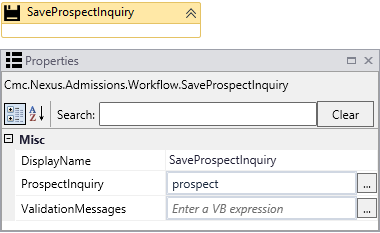
Properties
| Property | Value | Required | Notes |
|---|---|---|---|
| DisplayName | String
|
No | Specify a name for the activity or accept the default. |
| ProspectInquiryEntity | OutArgument
|
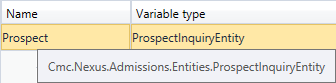
Yes | The Prospect Inquiry Entity created by this workflow activity. This is a variable that can be used as input for subsequent workflow activities. To identify the variable type, in the Variable type field of the Variables pane, select Browse for Types.... In the 'Browse and Select a .NET Type' window, navigate to Cmc.Nexus.Admissions.Contracts > Cmc.Nexus.Admissions.Entities, and select ProspectInquiryEntity.
See ProspectInquiryEntity Class in the Anthology Student Object Library. |
| ValidationMessages | OutArgument
|
No | Specify a variable that can be used to capture validation messages. For more information, see Capture Validation Errors. |
Database Fields
The SaveProspectInquiry activity can update the following fields in the database:
- Required fields:
StudentEntity.FirstName
StudentEntity.LastName
StudentEntity.SchoolStatusId
ProspectInquiryEntity.CampusId
ProspectInquiryEntity.LeadDate
ProspectInquiryEntity.AssignedAdmissionsRepId
- Optional fields:
ProspectInquiryEntity.LeadSourceId
ProspectInquiryEntity.LeadTypeId
StudentEntityEntity.DateOfBirth
StudentEntityEntity.Ssn
StudentEntityEntity.StreetAddress
StudentEntityEntity.PostalCode
StudentEntityEntity.EmailAddress
StudentEntityEntity.State
StudentEntityEntity.PreviousEducationId
StudentEntityEntity.WorkPhoneNumber
StudentEntityEntity.CitizenId
StudentEntityEntity.AlienNumber
StudentEntityEntity.City
StudentEntityEntity.CountyId
StudentEntityEntity.DriverLicenseNumber
StudentEntity.NationalityId
StudentEntity.NickName
StudentEntity.OtherEmailAddress
StudentEntity.OtherPhoneNumber
